Technical Deep Dive
Autoregressive video generation models can stream video in real-time, but they lack the control capabilities that batch models have: reference guidance, structural conditioning, selective editing. Building these from scratch would require extensive retraining.
What if you could adapt existing control mechanisms instead?

This post describes an adaptation of VACE (Video All-in-one Creation and Editing, Alibaba, ICCV 2025) for real-time autoregressive video generation. The adaptation enables reference-guided generation, structural conditioning, inpainting, and temporal extension in streaming contexts - using existing pretrained VACE weights without additional training.
All demos generated in real-time with FPS overlay showing actual generation speed per chunk. Try it yourself in Daydream Scope.
Background
Real-time video generation models like LongLive, Krea Real-Time, and StreamDiffusion V2 generate video in chunks using causal attention. Each chunk attends only to itself and past frames, enabling KV caching and bounded memory usage.
VACE provides unified video control for batch-oriented diffusion models:
Reference-to-Video (R2V): Style/subject guidance from reference images
Video-to-Video (V2V): Structural control via depth, pose, optical flow, edges
Masked Video-to-Video (MV2V): Inpainting, outpainting, temporal extension
Task Composition: Arbitrary combinations of the above
However, VACE assumes bidirectional attention and processes full video sequences at once. This is incompatible with streaming generation, which requires fixed chunk sizes and causal attention patterns.
This work adapts VACE's architecture to work within these constraints while preserving its control capabilities.
How VACE Works
Before diving into the adaptation, it helps to understand VACE's core architecture. VACE unifies video control through three optional inputs that combine with a text prompt:
VACE's mask input is central to its editing capabilities. The mask defines two distinct regions:
White regions (reactive): The model generates new content here
Black regions (inactive): The model preserves the original video content
For inpainting, this means you can mask a person in a video (white), provide a new prompt, and VACE regenerates only that region while keeping the background (black) intact. For outpainting, the original video becomes the inactive region while the expanded canvas becomes reactive.
This dual-stream approach encodes the two regions through separate paths to maintain isolation between preserved and generated content.
Regardless of task type, VACE follows the same processing pattern:
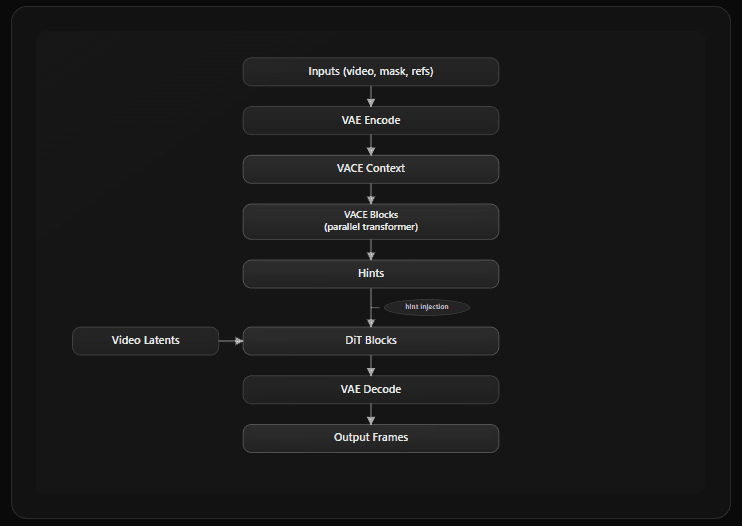
The VACE Blocks process the conditioning context and produce "hints" - additive signals injected into the main DiT pathway via zero-initialized projections. This architecture means VACE capabilities are layered on top of the base model rather than modifying it directly.
Most of VACE's primitives work in streaming contexts with the same core mechanisms:
The mask system, control signals (depth, pose, flow, scribble), and hint injection all operate with the same fundamental mechanisms. Streaming contexts require some cache management adaptations, but no architectural changes to these components.
The exception is reference image handling - and this is where the core adaptation work was needed.
The Architectural Problem
VACE concatenates reference frames directly into the diffusion latent space:
latent = [ref_frame_1 | ref_frame_2 | video_frame_1 | video_frame_2 | ...]
The model processes this combined sequence with bidirectional attention, then strips the reference frames from the output after denoising.
This approach has three incompatibilities with streaming:
Variable sequence lengths: Different tasks require different numbers of reference frames, preventing fixed-size chunk processing
KV cache contamination: Concatenated references become part of the model's causal history; they're cached and attended to as if they were previously generated frames. This is semantically wrong for conditioning (references should guide generation, not be treated as historical context). And it's irreversible: RoPE positional encodings are baked into cached K/V tensors, so removing references would require recomputing the entire cache.
Post-processing overhead: Reference frames must be identified and removed after each denoising step
The adaptation moves reference frames out of the diffusion latent space and into a parallel conditioning pathway:
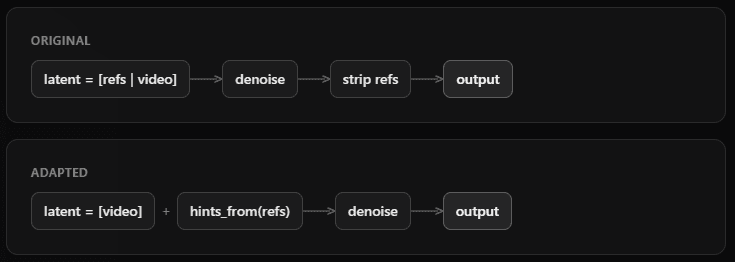
Reference frames are processed by separate transformer blocks (Context Blocks) that generate "hints" - additive signals injected into the main video pathway via scaled residuals.
This preserves fixed chunk sizes: video latents maintain consistent dimensions (typically 3 latent frames → 12 output frames, depending on the base pipeline), regardless of how many references are provided.
Why Pretrained Weights Transfer
The publicly released VACE weights use Context Adapter Tuning: the base DiT is frozen, and separate Context Blocks are trained to process references and inject hints. This is the architecture we adapt.
The Context Blocks are already trained to:
Encode reference information
Generate hints that influence the main pathway
Apply zero-initialized projections for gradual influence
The Context Blocks themselves are unchanged. They process references and produce hints using the same weights. The adaptation changes where those hints are injected.
VACE uses zero-initialized linear projections for hint injection. At initialization, hints contribute nothing. The trained weights encode how much influence to apply. These learned scaling factors remain valid in the adapted architecture.
How Reference Processing Works
All VACE modes - temporal extension, structural control, inpainting, and R2V - share a common reference processing pipeline:
Separate encoding: References are VAE-encoded into a parallel
vace_contexttensor, kept separate from video latentsContext Block processing: Parallel transformer blocks process references and generate "hints"
Hint injection: Hints are added to the main video pathway via scaled residuals (
x = x + hint * scale)Strength control:
context_scale(0.0–2.0) controls influence strength across all modes
The same mechanism drives depth-guided generation, first-frame extension, inpainting, and style transfer. The only difference between modes is what gets encoded as the reference.
Capabilities
Structural guidance from control signals processed per-chunk.
Supported signals (3-channel RGB from standard annotators):
Control frames are processed per-chunk using existing VACE control encoder weights.
Optical Flow Control:
Optical flow input provides another mode of control. Note that the flow helps determine the orientation of the subject. This is with a ‘dissolve’ LoRA, and the abstract particles from the style are also influenced by the flow control.
Another example of optical flow with a different prompt.
Depth Control:
Left: input video. Center: extracted depth maps. Right: generated output following structural guidance.
Scribble/Edge Control:
Scribble contours extracted from video (left) provide loose structural guidance. The model interprets the edges while adding detail and style. VACE context scale: 0.9 (higher adherence to control signal).
Same scribble input with context scale: 0.5 (lower adherence). The model takes more creative freedom while still respecting the general structure. Lower scales allow the model to deviate from the control signal, enabling more stylistic variation.
Gray Control:
Grayscale input can recolor input videos in targeted ways
Generate video connecting to provided keyframes. Reference frames appear in the output.
Modes:
firstframe- reference is first frame, generate continuation (useful for animating a static image)lastframe- reference is last frame, generate lead-in (useful for creating an intro to a specific endpoint)firstlastframe- two references, generate interpolation (useful for animating between storyboard keyframes)
Reference frames are encoded and placed at temporal boundaries. The model generates frames to fill the gap while maintaining coherence with anchors.
Image-to-video generation: a single reference image (left) is used as the first frame, and the model generates a coherent video continuation (right). The FPS overlay shows real-time generation speed per chunk.
Selective region generation with masked areas regenerated while preserving the rest.
Inpainting:
Static masks - same region masked every frame (e.g., fixed bounding box)
Dynamic masks - mask varies per frame; real-time segmentation systems like SAM3 integrate well
Outpainting:
Outpainting is masked video generation where the original image/video region is the inactive (preserved) area, and the expanded canvas is the reactive (generated) area.
Dual-stream encoding separates reactive (to be generated) and inactive (to be preserved) regions. Each stream uses its own VAE encoder cache to prevent temporal contamination. Preserved regions maintain full quality without blending artifacts at mask boundaries.
Character Transformation:
Image-to-video generation: a single reference image (left) is used as the first frame, and the model generates a coherent video continuation (right). The FPS overlay shows real-time generation speed per chunk.
Regional LoRA Application:
Combining inpainting with LoRA style transfer. The same mask is used, but a Studio Ghibli LoRA transforms the person into a stylized character while preserving the background.
Outpainting:
Here we extend the close up shot of the waterfall. Compare to the temporal extension video above.
Reference images (1-3) guide style, subject, or character appearance. References influence generation but do not appear in output frames - think style transfer rather than keyframe interpolation.
R2V uses the same hint injection pipeline described above, but with a key difference: references provide persistent stylistic guidance across all chunks rather than anchoring specific frames.
Note: R2V is significantly more experimental than other capabilities. Detail preservation and reference fidelity are noticeably reduced compared to batch VACE due to causal attention constraints. The causal attention pattern and per-chunk processing fundamentally limit how well references can guide generation - R2V currently works better as coarse style guidance rather than precise subject/character transfer.
Capabilities combine freely. The system infers mode from provided inputs:
Multiple reference images → R2V
Video + mask → MV2V
Control signal → V2V
Combinations → Composed mode
No explicit mode parameter required.
Layout/Trajectory Control:
Point-based subject control: a subject image is used to establish identity in the first frame (extension mode), then trajectory control guides the subject's position in subsequent chunks. The layout signal (white background with black contour) indicates where the subject should appear.
Implementation Details
The following architecture has been implemented in Daydream Scope.
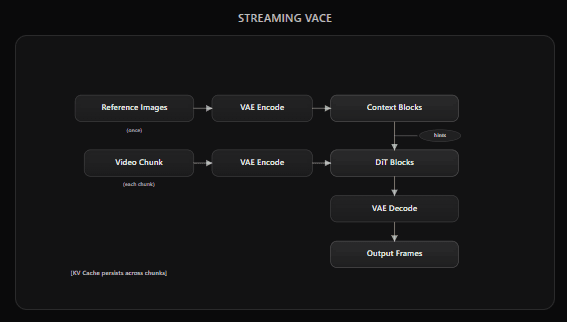
All Wan 2.1 based autoregressive pipelines in the codebase support VACE
via the VACEEnabledPipeline mixin:
Performance
Benchmarks measured on single NVIDIA RTX 5090 32GB. Configuration: LongLive 1.3B (bfloat16), 368×640 resolution, 4 denoising steps (timesteps [1000, 750, 500, 250]), 12 frames per chunk, TAE, SageAttention enabled. Numbers collected from the VACE test script; FPS is measured per-chunk and burned into demo videos as overlay. These are inference-only measurements; expect a small throughput gap when running in Daydream Scope due to UI and streaming overhead.
Comparison to Alternatives
The primary alternative for real-time controlled video generation is MotionStream, a fully distilled model with built-in trajectory control. MotionStream is purpose-built for a single control modality and achieves higher quality for that specific use case. However, it requires full model retraining for each control type.
This VACE adaptation trades some quality for versatility: a single set of pretrained weights enables depth control, scribble guidance, inpainting, layout control, and arbitrary combinations - without retraining. The approach is more extensible to new control types as the community develops them for batch VACE.
Limitations & Known Issues
Temporal coherence: Can degrade over extended generations (100+ frames) without re-anchoring or keyframe injection - this is largely a consequence of autoregression in general
Control signal variance: Some signals (depth, scribble, layout) work reliably, while others need more tuning
First+last frame extension in combination: Reduced utility when compared to batch paradigm due to small chunk sizes in streaming contexts
Reference-to-Video (R2V): This is the most problematic capability in the streaming adaptation. Detail preservation and reference fidelity are severely degraded compared to batch VACE. The causal attention pattern and per-chunk processing fundamentally limit how well references can guide generation. R2V currently works better as coarse style guidance rather than precise subject/character transfer. Further architectural work is needed to approach batch-quality R2V in streaming contexts.
The batch VACE ecosystem has accumulated extensive community-driven examples and techniques over months of use—various control signal combinations, preprocessing pipelines, and creative workflows. Many remain unexplored in the streaming context.
Summary
By moving reference frames from the diffusion latent space into a parallel conditioning pathway, this adaptation preserves the fixed chunk sizes and KV caching that autoregressive models require—while reusing existing VACE weights directly.
Key contributions:
Pretrained weight transfer: Existing VACE weights work directly in streaming contexts
Maintained capabilities: Structural control, masked generation, and temporal extension all function in real-time
Model agnostic: The composition-based design adapts to different Wan1.3b and Wan14b based autoregressive models
Practical performance: 20+ fps generation with control on consumer hardware at modest resolutions like 368x640, faster with LightVAE
